Template Variables
Template variables let users reference data from upstream nodes using {{ variable }} syntax. When a config field uses format: "template", FlowDrop provides autocomplete for available variables.
How It Works
Section titled “How It Works”- A node has a config field with
format: "template" - FlowDrop analyzes the upstream nodes connected to the current node
- Output port schemas from those nodes become available as template variables
- Users type
{{and get autocomplete suggestions
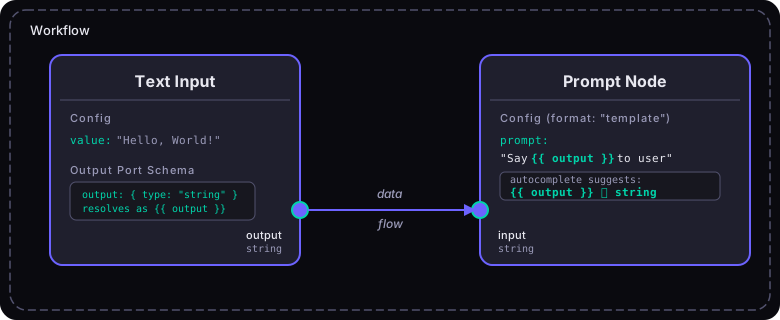
Configuring Template Fields
Section titled “Configuring Template Fields”In your node’s configSchema, use format: "template" with a variables configuration:
{ "type": "object", "properties": { "prompt": { "type": "string", "title": "Prompt Template", "format": "template", "variables": { "ports": ["prompt_input"], "showHints": true } } }}Variable Sources
Section titled “Variable Sources”The variables config supports three sources:
1. Port-Derived Variables
Section titled “1. Port-Derived Variables”Automatically derive variables from upstream node connections:
{ "variables": { "ports": ["input"], "includePortName": true, "showHints": true }}ports— which input port IDs to derive variables fromincludePortName— prefix variables with the port name (default: false)showHints— show clickable variable hints below the editor (default: true)
2. Static Schema
Section titled “2. Static Schema”Define variables explicitly:
{ "variables": { "schema": { "variables": { "user": { "name": "user", "type": "object", "properties": { "name": { "name": "name", "type": "string" }, "email": { "name": "email", "type": "string" } } }, "timestamp": { "name": "timestamp", "type": "string" } } } }}3. API-Fetched Variables
Section titled “3. API-Fetched Variables”Fetch variables from an API endpoint at runtime:
{ "variables": { "api": { "endpoint": { "url": "/api/flowdrop/nodes/{nodeId}/variables?workflowId={workflowId}", "method": "GET" }, "cacheTtl": 300000, "mergeWithSchema": true, "fallbackOnError": true } }}The URL supports {workflowId} and {nodeId} placeholders that resolve at runtime.
Template Syntax
Section titled “Template Syntax”FlowDrop’s template editor supports Jinja-like syntax:
Variable Access
Section titled “Variable Access”{{ variable_name }} Simple variable{{ user.name }} Object property (dot notation){{ items[0].title }} Array index access{{ items[*].title }} All items wildcardSupported Syntax
Section titled “Supported Syntax”{{ ... }} Variable interpolation{% ... %} Block statements{# ... #} CommentsAutocomplete Behavior
Section titled “Autocomplete Behavior”The template editor provides intelligent autocomplete:
{{triggers top-level variable suggestions.after a variable triggers property drill-down[after an array variable triggers index suggestions ([0],[1],[*])- Type icons show the variable type:
𝑆string,#number,☑boolean,[]array,{}object
Port Schemas for Variable Resolution
Section titled “Port Schemas for Variable Resolution”For port-derived variables to work, upstream nodes need output ports with schema:
{ "id": "data_processor", "outputs": [ { "id": "result", "name": "Result", "type": "output", "dataType": "json", "schema": { "type": "object", "properties": { "summary": { "type": "string" }, "score": { "type": "number" }, "tags": { "type": "array", "items": { "type": "string" } } } } } ]}This makes {{ result.summary }}, {{ result.score }}, and {{ result.tags[0] }} available as template variables in downstream nodes.
Registering the Template Editor
Section titled “Registering the Template Editor”The template editor requires CodeMirror. Register it before mounting:
import { registerTemplateEditorField } from '@flowdrop/flowdrop/form/code';registerTemplateEditorField();Without registration, template fields fall back to plain text inputs.
Variable Schema Merging
Section titled “Variable Schema Merging”When multiple sources are configured (ports + schema + API), they merge with this precedence:
- API variables (highest priority)
- Static schema variables
- Port-derived variables (lowest priority)
Configure merging behavior:
{ "variables": { "ports": ["input"], "schema": { "variables": { "env": { "name": "env", "type": "string" } } }, "api": { "endpoint": { "url": "/api/variables/{nodeId}" }, "mergeWithSchema": true, "mergeWithPorts": true } }}