What is a Workflow?
FlowDrop is a visual workflow editor — a UI component that lets users build directed graphs of processing steps by dragging, connecting, and configuring nodes on a canvas.
Before diving into code, it’s important to understand the mental model.
The Four Primitives
Section titled “The Four Primitives”Every workflow in FlowDrop is built from four core concepts:
A node is a single step in the workflow. It represents an action, decision, or data transformation — for example, “Send an HTTP request”, “Run an LLM prompt”, or “Route based on condition”.
Each node has:
- A type that determines its visual appearance (default, simple, square, tool, gateway, terminal, idea, note)
- Metadata describing its name, icon, category, and capabilities
- Configuration — user-editable settings defined by a JSON Schema
An edge is a connection between two nodes. It defines the flow of data or control from one step to the next.
Edges have categories that determine their visual style and semantic meaning:
- data — standard data flow (default)
- trigger — event-based activation
- tool — tool invocation from an agent
- loopback — feedback loops
A port is a typed connection point on a node. Nodes have input ports (receiving data) and output ports (sending data). Ports represent the runtime data that flows between nodes during execution — the actual payloads that one node passes to the next.
Each port has a data type (e.g., string, json, file, trigger). FlowDrop enforces type-safe connections — you can only connect ports with compatible data types.
For example, an LLM node might have:
- An input port of type
stringthat receives the user’s prompt - An output port of type
jsonthat emits the model’s response
Ports are unique to each connection — every edge carries its own data between a specific pair of nodes.
Config
Section titled “Config”Configuration is different from ports. While ports carry runtime data that varies with each execution, config holds shared settings that apply consistently across all runs of the workflow.
Config values are defined by a JSON Schema and edited through a form UI when users click on a node. They control how a node behaves rather than what data it processes.
For example, the same LLM node might have config fields for:
- Model name — which LLM to use (e.g.,
claude-sonnet-4-20250514) - Temperature — how creative the responses should be
- Max tokens — the response length limit
These values don’t change from request to request — they’re decisions the workflow author makes once, and every execution of the workflow uses them.
How It All Fits Together
Section titled “How It All Fits Together”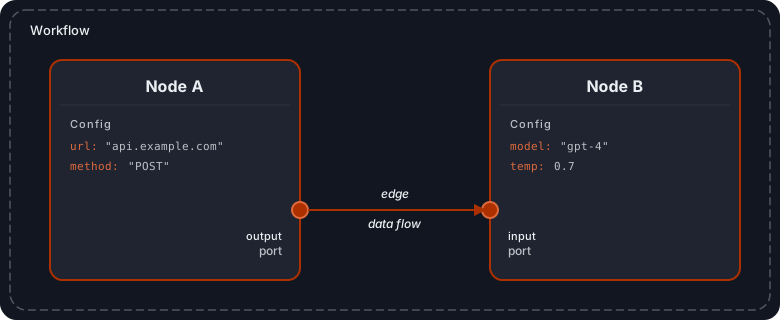
A workflow is a graph: nodes are the vertices, edges are the connections, ports define where connections attach, and config controls what each node does.
What FlowDrop Does (and Doesn’t Do)
Section titled “What FlowDrop Does (and Doesn’t Do)”FlowDrop is a frontend editor. It handles:
- Visual canvas with drag-and-drop, zoom, pan
- Node palette and sidebar for discovery
- Connection drawing with type-safe port validation
- Configuration forms generated from JSON Schema
- Workflow serialization to JSON
- Undo/redo, auto-save drafts, import/export
FlowDrop does not handle:
- Execution — It doesn’t run your workflows. You need your own backend execution engine.
- Storage — It calls your REST API to persist workflows. You provide the database.
- Business logic — Node behavior is defined by your backend, not by FlowDrop.
Think of it this way:
FlowDrop owns the UI. You own the logic.
FlowDrop gives users a beautiful way to design workflows. Your backend gives those workflows meaning.
The Frontend–Backend Contract
Section titled “The Frontend–Backend Contract”FlowDrop communicates with your backend through a REST API. The contract is simple:
- Your backend tells FlowDrop what nodes exist — by serving node metadata (name, ports, config schema)
- Users build workflows visually — FlowDrop handles all the UI
- FlowDrop sends the workflow JSON to your backend — for storage and execution
For a detailed breakdown of this architecture, see Architecture Overview.
When to Use FlowDrop
Section titled “When to Use FlowDrop”FlowDrop is a good fit when you need:
- A visual, no-code interface for building multi-step processes
- AI agent workflows with branching, tool use, and human-in-the-loop
- Data pipelines with configurable transformations
- Automation builders where non-technical users define business logic
- Any application where users need to compose processing steps visually
Next Steps
Section titled “Next Steps”- Architecture Overview — how all the pieces fit together
- Installation — get FlowDrop into your project
- Tutorial — build your first workflow editor step by step